
To turn a YouTube lecture into a study guide, transcribe an eligible public recording in Damas, open Insight Studio and choose Study guide. Review the saved result in Outputs, then use Damas quizzes and flashcards to practice recalling the material. Check important answers against the lecture.
Damas supports public, on-demand YouTube, Instagram and X video links up to 90 minutes. Use only material you have permission to process. Private, restricted and live videos are unsupported, and a public link can also be inaccessible. Damas is available on compatible iPhone, iPad and Mac devices.
Create a study guide in Insight Studio
- Keep the lecture's original link and title. Write one learning goal, such as explaining a concept and distinguishing it from a similar one.
- Connect to the internet, sign in with Apple and add the supported link in Damas. Review the AI processing consent. Processing uses media minutes and Insight credits. Check your balances, usage history and the cost before confirming. Available plans and optional top-ups appear in the app.
- Create the original-language transcript, then open it and read important definitions, numbers and qualifications. Replay unclear passages and inspect diagrams or other screen-only information yourself.
- In the completed transcript, select Insight Studio, the wand-and-stars control. Compact views may show just the icon. Under Study, choose Study guide and set Output language. Use Customize to add a topic focus or a learning or exam objective. For example, ask for an explanation of one concept for a beginner that includes the conditions the lecturer gives.
- Review the displayed cost, then select Generate. Damas keeps the transcript and saves the guide separately. You can leave the app during online processing and receive a completion notification if enabled. Open Outputs to read the finished guide.
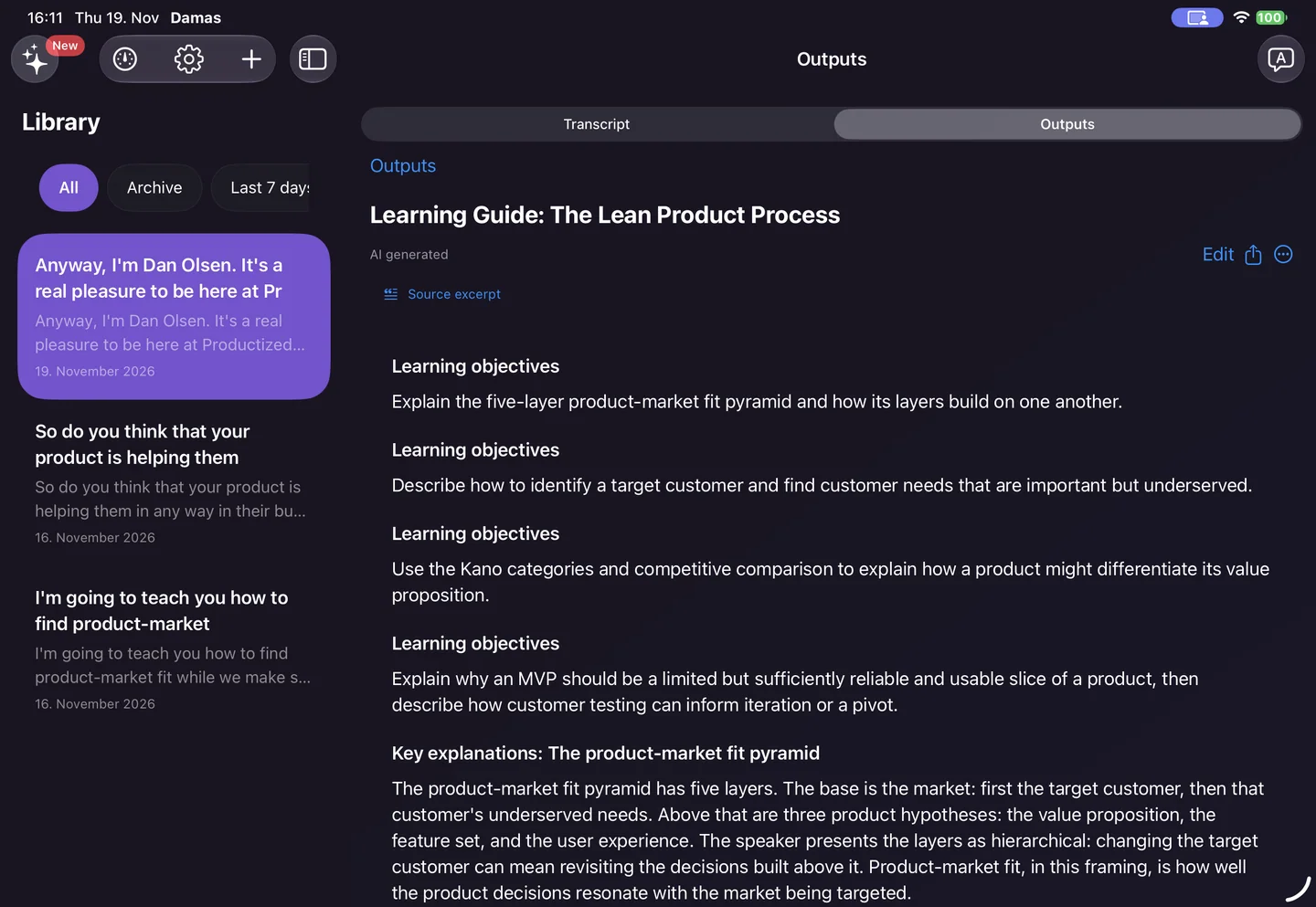
Study-guide output from a product-market fit talk, captured in iPad staging on November 19. The fictional workshop exercise below is a separate example.
Use the guide, quizzes and flashcards
Read the study guide alongside the original transcript. If the guide shows a Source excerpt, read the surrounding passage and check it against the recording. Then edit, copy or share your checked text and notes.
For practice, use Insight Studio to create a Quiz or Flashcards from the transcript:
- In Quiz, answer the questions and read the explanations. Select Try again for another attempt. Check important explanations against the lecture, even when the app marks your selection correct.
- In Flashcards, try to answer before selecting Reveal answer. Compare your response with the revealed answer and use Review again for cards you want to revisit.
The exercise below helps you keep your own record of what to study next.
A manual exercise to choose the next review
Identify the central idea and its stated conditions. Hide the explanation and answer a question in your own words, then compare your answer with the full checked passage. Record the question, your answer, its source passage and the next review needed. If the lecture does not explain a point, mark it “not stated”. This record is your own method, separate from the app's quiz feedback.
If your answer omits a stated condition, return to that condition and try again. If it adds a claim the lecture never makes, remove it and locate the actual supporting passage. If the audio itself is unclear, mark the source as unresolved before judging your answer. Recheck that question after revisiting the passage, keeping the earlier attempt beside the correction.
Example: a fictional lecture on organizing a workshop
Imagine a lecturer explains that a materials list can reveal missing supplies but does not establish whether those supplies work. This is an invented teaching example, not a real lecture or app test.
- Question: What does the list help reveal? Your answer should retain the stated purpose: missing supplies.
- Follow-up: What does the list not establish? The stated limit is whether supplies work. Check the actual source before recording a similar answer for a real lecture.
- Review decision: If you remembered the benefit but missed the limit, revisit both passages together. Do not turn the example into a claim that a list prevents every preparation problem.
For your own lecture, retain the source link and enough surrounding words to find the explanation again. Use quotation marks only for exact speech checked against the recording. If the lecturer points to a diagram without explaining it aloud, read that diagram yourself and label it as a visual note.
The summary workflow helps you orient yourself before studying. For a definition with several conditions, use the definition exercise; start with transcription if you need the full text first.
Accuracy and processing time vary. If the source becomes inaccessible, keep unfinished checks open. Damas does not download media, accept video file uploads, dub speech, embed subtitles or process offline. Share notes only within your reuse rights.
Damas Technologies LLC